
CMS Website Development in Australia
Pixbit Solutions builds content-managed websites for Australian businesses on headless CMS or WordPress, set up so your team can publish pages without a developer.
Overview
What Is CMS Website Development?
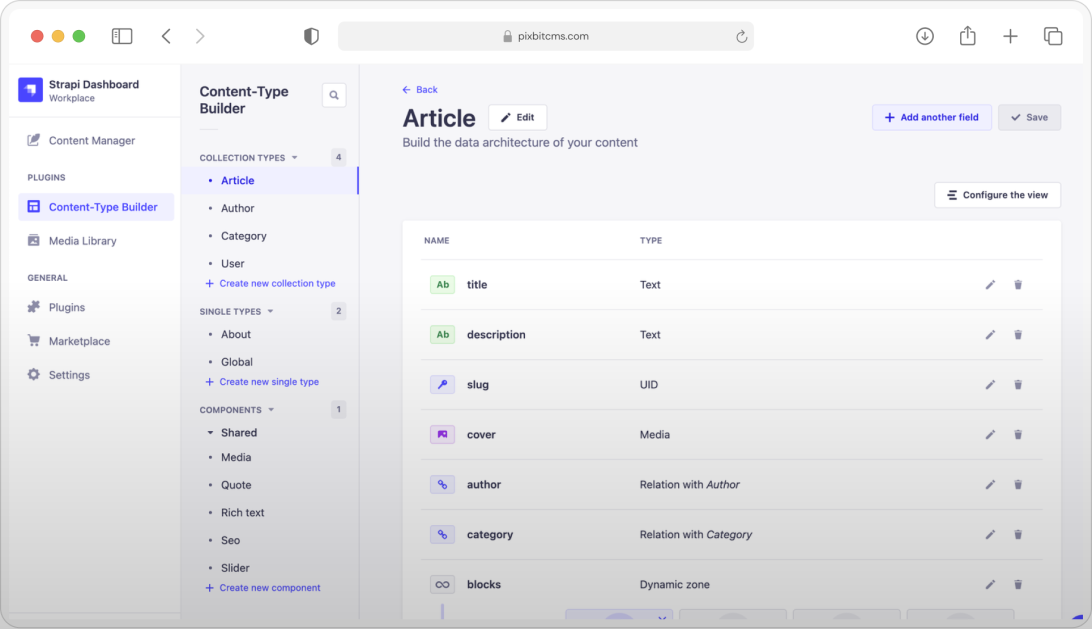
CMS website development is building a website on a content management system, so non-technical staff can create and update pages, blogs and media themselves. The CMS can be traditional, such as WordPress, or headless, such as Strapi or Payload paired with a Next.js front end. For Australian businesses, a good CMS build also enforces accessible content, protects forms and user data, and keeps publishing fast and secure.
CMS Development Services
The right CMS for your content, your editors and your security needs, set up properly from day one.

Headless CMS Websites
Next.js front ends with Strapi or Payload CMS, giving editors a clean interface and visitors a fast, secure site.

WordPress Development
Custom WordPress themes and blocks for marketing sites that need a familiar editor and a large plugin ecosystem.

CMS Migration
Content, media and URLs moved from an old CMS with redirects planned, so search rankings are protected.

Content Modelling and Editor Experience
Content types, reusable blocks and publishing roles designed around how your team writes and approves.

Multi-site and Multilingual CMS
One CMS powering several brands, regions or languages, with shared components and local control.

CMS Security and Maintenance
Updates, backups, access controls and monitoring that keep your CMS patched and available.
Every page your team publishes carries legal and security obligations. We build the CMS to help them meet them.
01
Accessibility Under the DDA
Components and editor rules built to WCAG 2.2 AA, the benchmark the Australian Human Rights Commission points to for websites.
02
Privacy and Forms
Enquiry forms, analytics and tracking set up in line with the Australian Privacy Principles, with a privacy policy that matches.
03
Spam Act for Newsletters
Sign-up forms that capture consent and connect to email tools with working unsubscribe handling.
04
Patching and Access Control
Regular updates, multi-factor authentication and least-privilege editor roles, aligned with the ASD Essential Eight.
Why Australian Teams Choose Pixbit for CMS Websites

Editors Come First
We design the content model with the people who will use it every day, so publishing is quick and hard to break.
Accessibility Guardrails
Required alt text, heading rules and accessible components help every new page meet WCAG 2.2 AA.

Why Australian Teams Choose Pixbit for CMS Websites

Speed and Security
Headless builds keep the public site separate from the editing system, which improves page speed and reduces attack surface.

Training Included
Your team is trained on the CMS before launch and receives short guides for everyday tasks.
A CMS Your Team Will Actually Use
Tell us who edits your site and what slows them down. We will reply with a content model, a platform recommendation and a cost band.
Feedback from teams we have designed, built and supported software for.
Choosing Pixbit Solutions to revamp our e-learning platform was the best decision we made. Their creative team transformed our site into a highly responsive and engaging platform within a tight deadline, exceeding our expectations. They consistently prioritised our needs throughout the process. For anyone seeking excellence in-app or web development, partnering with Pixbit Solutions is a clear choice.

Mohamed Shahanavas M
CEO, Founder of RoseappI have been partnering with Pixbit Solutions for the last 3 years, and the experience has been consistently rewarding. Their precise understanding of requirements and their ability to handle even the most urgent tasks with exceptional speed and accuracy truly stands out. Pixbit Solutions is the top choice for anyone seeking a premier app development company.

Kasra Jafroodi
Senior AssociateFive steps from content audit to a CMS your team owns.
Content Audit
We review your current pages, media and URLs, and agree what moves, what changes and what retires.
Content Modelling
Content types, blocks and roles are designed around how your editors work.
Design and Build
Accessible templates and components built on your chosen CMS, reviewed in a staging site.
Migrate and Train
Content and media migration, 301 redirects and hands-on training for your editors.
Launch and Support
Go-live, Search Console checks and ongoing updates, backups and improvements.
Tell us how your team publishes today and what slows them down. We will reply with a scoped plan.
Our CMS Technology Stack
Strapi, Payload and WordPress with Next.js front ends, hosted on mainstream cloud infrastructure.
Front end
Back end
Database
Frameworks
Quality Assurance
HTML 5
JavaScript
CSS
Swift
Kotlin
Dart
Flutter
React
Next.js
Angular
Vue.js
Laravel
PHP
Selenium
MySQL
SQLite
Firebase
Redis
Node.js
Magento
MariaDB
Appium
MongoDB
CMS Website Development in Australia at a Glance
The key facts at a glance for Australian businesses.
CMS options
Strapi, Payload, WordPress
Front end
Next.js or custom WordPress themes
Editors
Content types, reusable blocks and publishing roles set up for your team
Accessibility
WCAG 2.2 AA components and editor guardrails
Migrations
URL mapping and 301 redirects to protect rankings
Hosting
Australian cloud regions available
Other ways Pixbit supports Australian businesses.

Fast, accessible websites and web applications.

Corporate websites built for speed and accessibility.

Shopping apps and online stores for Australian buyers.

Research-led website and product design.
What Australian businesses ask us before starting.
Ready for an Easier CMS?
Let's Make It Happen
Tell us how your team publishes and what gets in the way. Pixbit scopes in a single discovery session.